What is tail latency (p99) in real-time analytics, and why does it matter for user experience?

TL;DR
Tail latency (p99) is the UX metric that matters in real-time analytics. One slow widget makes the whole dashboard feel broken, even if average latency is low.
Distributed OLAP amplifies outliers: with scatter-gather queries, a “1% slow node” can make most user queries slow as shard count grows (fan-out effect).
Common p99 drivers: resource contention (merges/compactions), data skew (hot shards/stragglers), JVM GC pauses, and JIT warm-up.
Measure p99 correctly: don’t average percentiles, avoid coordinated omission, and measure from the client (not just server logs).
Reduce p99 with architecture + design: workload isolation, vectorized execution, hedged requests, materialized views, and good sorting/indexing. Plus timeouts and caching at the app layer.
You’ve probably lived through the “dashboard delay” reality. You load a critical analytics view, and nineteen charts appear instantly. But one widget, maybe the most important revenue aggregation, spins for five seconds.
In that moment, the speed of those other nineteen charts doesn’t matter. The application feels broken.
In real-time analytics (OLAP), average latency is a vanity metric. It masks the frustration of your most active users. The metric that actually defines user trust is tail latency, specifically the 99th percentile (p99).
Analytics are shifting from back-office reporting to user-facing features: embedded dashboards, personalization engines, observability platforms. And tolerance for latency spikes has dropped to zero. Users don’t care about average query speed. They care about the one query that hangs.
For engineering leads and platform architects, taming the tail isn’t an optimization exercise anymore. It’s a requirement for system survival.
Business impact of high p99 tail latency: churn, SLAs, and revenue
When you’re building internal BI tools, a slow query might make an analyst grab a coffee. But in user-facing analytics, high tail latency has direct, quantifiable business costs.
How p99 latency affects user engagement and churn
Human-Computer Interaction (HCI) research consistently identifies 300ms as the threshold for “flow state.” Beyond this limit, the user’s cognitive stream breaks.
Here’s the thing: intermittent slowness often damages more than consistent moderate slowness. If a user clicks a filter and the dashboard freezes for three seconds (a p99 event), their confidence in the underlying data erodes. They perceive the application as “buggy” or the data as “stale.”
Repeated exposure to high tail latency drives users to abandon the platform entirely. They revert to manual workarounds like exporting data to spreadsheets.
How p99 latency causes SLA breaches and financial penalties
For data products that expose APIs, like fraud detection signals or ad-tech bidding, latency is contractually enforced. A Service Level Agreement (SLA) often stipulates that 99.9% of requests must complete within a specific timeframe (e.g., 500ms).
A system with low average latency (e.g., 50ms) but high p99 (e.g., 2000ms) will violate this SLA. These breaches trigger financial credits to customers and damage partner relationships.
In high-frequency trading or real-time bidding, a tail latency spike means missing the market opportunity entirely.
Why average latency hides p99 tail latency in distributed systems
To solve latency problems, you need to measure the right things. In distributed systems, the arithmetic mean (average) deceives.
Consider a system processing 100 queries. If 99 queries finish in 10ms and 1 query takes 10 seconds because of a garbage collection pause, the average latency is roughly 110ms. This average looks healthy on a high-level report. But the p99 is 10,000ms.
For the user experiencing that 10-second delay, the “110ms average” is a lie.
That user is likely a “power user,” someone processing larger datasets or wider date ranges. These are often your most valuable customers. And “average” monitoring hides their misery.
What is tail latency (p99/p99.9) in analytics?
Tail Latency refers to the small percentage of response times that take the longest to complete, typically represented by the 99th (p99) or 99.9th (p99.9) percentile. In analytical databases, these outliers stem from resource contention, data skew, or background processes. While average latency measures throughput efficiency, tail latency measures reliability and user trust.
Why distributed query fan-out amplifies p99 tail latency
Tail latency is critical in OLAP because of how modern analytical databases work. Unlike key-value stores that fetch a single row, analytical databases use a “scatter-gather” pattern.
A single user query splits into sub-queries and fans out to dozens or hundreds of shards (nodes). The coordinator waits for all shards to return results before aggregating and sending the final response.
Fan-out effect: how one slow shard drives global p99 latency
In this architecture, the p99 of a single node becomes the p50 (median) of the global query.
Mathematically, if you have N nodes, and each node has a probability P of being slow (e.g., 1% or 0.01), the probability that the entire user request will hit at least one slow node is:
If your individual nodes have a 1% chance of being slow (p99), here’s how that impacts the user as you scale:
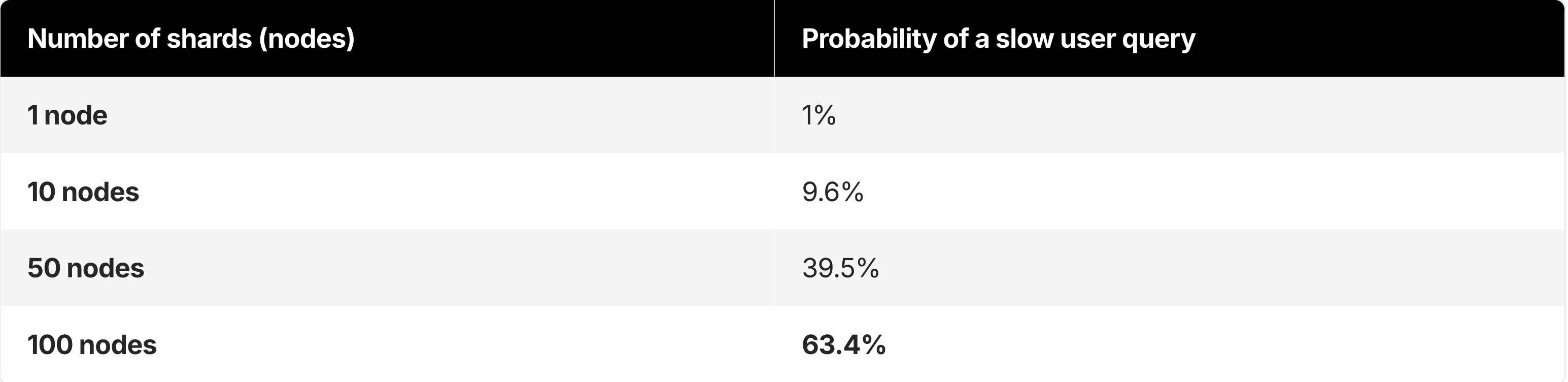
At 100 nodes, a “1% rare event” happens on nearly two out of every three queries.
This mathematical relationship explains why adding more hardware often fails to fix latency issues in distributed analytics. Without addressing the root cause of variance, you’re simply increasing the surface area for tail events.
Common causes of p99 tail latency in analytical databases
Competitors often blame “network blips” for latency spikes. But in analytical workloads, the call is usually coming from inside the house. The complex mechanics of columnar databases introduce unique sources of variance.
Resource contention (noisy neighbor) as a cause of p99 latency spikes
Analytical databases rely on background processes to maintain performance. Log-Structured Merge (LSM) trees, common in systems like ClickHouse, RocksDB, and others, require background merges (compactions) to combine small data parts into larger, efficient ones.
If these merges lack isolation, they consume massive I/O and CPU resources, starving interactive queries running simultaneously. This contention manifests as random latency spikes during high ingestion.
Data skew and hot shards: why stragglers increase p99 latency
In a distributed system, data is partitioned across nodes using a sharding key. If that key is chosen poorly (e.g., sharding by customer_id when one customer has 1000x more data than others), you create “hot shards.”
The system processes 99 shards instantly, but the query hangs waiting for the single overloaded shard to finish. This “straggler” defines the latency for the entire request.
Garbage collection pauses (JVM) and stop-the-world p99 latency
Many legacy analytics engines run on the Java Virtual Machine (JVM). While the JVM excels at many workloads, it introduces “Stop-the-World” Garbage Collection (GC) pauses.
When the heap fills up, the application threads halt while memory is reclaimed. In a scatter-gather system, if any node hits a GC pause during a query, the user waits.
GC pauses drive the shift toward native code engines (C++) that manage memory manually to ensure predictable execution times.
JIT compilation warm-up and first-query p99 latency
Complex analytical SQL often requires the database to compile query plans. In JIT-based systems, the first execution of a query can be significantly slower than subsequent runs as the system optimizes the code path.
This “warm-up” penalty appears as a tail latency spike for the first user to run a new type of report.
How to measure p99 tail latency correctly
Most engineering teams underreport their tail latency because of flaws in standard observability tools.
Why you can’t average p99 percentiles across nodes
A common mistake is aggregating p99s across hosts. If you take the p99 latency of Node A, Node B, and Node C, and then average them, the result is statistically meaningless.
You cannot average percentiles. To get an accurate global p99, you must aggregate the raw histogram buckets from all nodes.
What is coordinated omission, and how does it distort p99 latency?
Coordinated omission is the silent killer of accuracy. Standard load testing tools often wait for a response before sending the next request. If the system stalls for 10 seconds, the load tester stops sending requests.
So the tester fails to record the latency of the requests that should have been sent during that window.
This phenomenon, known as Coordinated Omission, means your monitoring tool reports a p99 of 500ms when reality is closer to 5 seconds. Tools like HdrHistogram that correct for coordinated omission by tracking expected intervals are essential for honest measurement.
Client-side vs. server-side p99 latency measurement
Database logs report how long the query took to execute internally. They don’t account for network round-trips, driver serialization, or client-side rendering.
A query might finish in 50ms on the server. But if the result set is 50MB of JSON, the user might wait 2 seconds for the data to traverse the wire and parse.
Always measure p99 from the client’s perspective to capture the true user experience.
How to reduce p99 tail latency in real-time analytics
Solving tail latency requires an architecture designed to minimize variance, not just “tuning queries.” Here’s a tiered approach to stabilizing p99s, moving from application patterns to foundational architecture.
Architecture patterns to reduce p99 tail latency
Architecture determines success or failure. If your engine lacks variance control, no amount of query tuning will save you.
Vectorized execution: Modern engines like ClickHouse use vectorized execution, processing data in CPU-cache-aligned blocks (vectors) rather than row-by-row. Beyond raw speed, vectorization drastically reduces variance. By minimizing CPU branch mispredictions and stalls, query times become predictable.
Workload isolation: To prevent the “noisy neighbor” problem, look for architectures that separate ingestion compute from query compute. This separation ensures that a massive data load or background merge operation doesn’t steal CPU cycles from an interactive dashboard query.
Hedged requests: For mission-critical p99 SLAs, use hedging. Send the same query to two different replicas. If the first replica doesn’t respond within a tight threshold (e.g., the p95 time), fire a duplicate request to a second replica. The client uses whichever response arrives first. Google benchmarks have shown hedging can reduce p99.9 latency from 1,800ms to 74ms with only a 2% increase in load. Note: Hedging requires careful implementation to avoid cascading retries during outages.
Data modeling and schema design to reduce p99 tail latency
Materialized views: The most effective way to crush tail latency is to do the heavy lifting before the user asks for it. Materialized Views pre-compute complex aggregations and joins as data is inserted. Instead of scanning a billion rows at query time, the database scans a few thousand pre-aggregated rows. This turns high-variance analytical queries into low-variance, key-value-style lookups.
Sparse indexing & sorting: Ensure your data is physically sorted on disk by the columns most frequently used in WHERE clauses. Proper sorting allows the database to skip huge swaths of data (Granule Skipping), reducing the I/O variance caused by scanning cold data from disk.
Application and query patterns to reduce p99 tail latency
Active timeouts: Never let a UI hang indefinitely. Set aggressive client-side timeouts (e.g., 3 seconds). Failing fast and letting the user retry beats freezing the browser.
Caching layers: Caching doesn’t fix the database tail, but it protects the user from it. Cache identical queries for short windows (e.g., 5-10 seconds) to absorb the impact of users mashing the “refresh” button during a slowdown.
Key takeaways: why p99 tail latency matters and how to fix it
In distributed real-time analytics, tail latency is a mathematical certainty. Not an anomaly. As you scale to more nodes and more users, the probability of a slow query approaches 100%.
Engineering teams often fail by trying to optimize the average case, ignoring the fan-out effect that amplifies small outliers into major user experience failures.
To build trust with users, you need to shift your focus to the p99. This means taking an honest look at your observability (accounting for Coordinated Omission), taking a rigorous approach to schema design (using Materialized Views), and ultimately choosing an underlying architecture built for predictability. One that uses vectorized execution and workload isolation to tame the tail.
If your current data warehouse struggles with unpredictable spikes that break user flows, it may be time to evaluate a specialized real-time OLAP engine. Tools like ClickHouse are explicitly designed to handle the high-concurrency, low-latency requirements that generic data platforms often fail to meet at the tail.
FAQ
What is p99 latency in real-time analytics?
p99 latency (tail latency) in real-time analytics refers to the 99th percentile of query response times, meaning that 99% of queries complete faster than this value while the slowest 1% take longer. It measures the worst-case performance users are likely to experience, rather than the average speed. In user-facing analytics systems such as dashboards or observability tools, p99 latency is critical because a single slow query can delay the entire result, making the application feel slow or unreliable. As a result, p99 latency is often used to evaluate the reliability and consistency of system performance in real-time analytics environments.
Why does p99 matter more than average latency for dashboards?
Users experience the slowest widget, not the average. One p99 outlier can block interaction and make the entire dashboard feel broken even if most queries are fast.
How does the fan-out (scatter-gather) pattern increase tail latency?
A single query splits across many shards and the coordinator waits for all of them. As shard count grows, the chance that at least one shard is slow rises sharply, pushing global p99 higher.
What are the most common causes of p99 spikes in analytical databases?
Resource contention (merges/compactions), data skew (hot shards/stragglers), garbage collection pauses, and first-run/JIT warm-up effects frequently drive tail latency.
What is coordinated omission and why does it hide p99 latency?
Coordinated omission happens when a load tester stops sending requests while waiting on slow responses, so it fails to record the delays that users would experience. This behavior makes reported p99 look artificially low.
Why can’t you average p99 across nodes?
Percentiles aren’t additive. Averaging per-node p99 values produces a statistically invalid number. To compute a true global p99, you need aggregated histograms or raw latency samples across nodes.
Should p99 be measured on the client or the server?
Measure p99 from the client whenever possible. Server timings miss network transfer, serialization, queuing, and rendering overhead that affects real user experience.
What are the fastest ways to reduce p99 latency in OLAP workloads?
Precompute with materialized views, reduce variance with workload isolation, and avoid stragglers via better sharding/sorting. For strict SLAs, hedged requests can cut p99.9 at the cost of modest extra load.
What is a “good” p99 latency target for interactive analytics?
It depends on the UX, but interactive filtering typically aims for sub-second p99, and many teams target ~300–500ms for “feels instant” interactions. The key is consistency: stable p99 beats a low average with frequent spikes.
Do materialized views help tail latency or just average latency?
They primarily help tail latency by turning expensive, variable queries into predictable lookups over pre-aggregated data, reducing the chance of long scans and stragglers.